Inventory 2.0 Suggestions

bjcasey

ISX Specialist
Cross post from: http://www.bjscripts.com/home/index.php/forum/eq2-inventory/29-inventory-2-0-suggestions#63

In the near future I plan on doing a rewrite of Inventory to update it and make it more relevant to our current needs. I have learned a lot about coding since I first wrote it and feel that a lot of things could be done much better.

I would like to request your input on what you would like to see it do. It could be anything related to inventories and their management.

Some already suggested items include, but are not limited to:

  1. UI cleanup and simplification
  2. Adding a default auto loaded profile
  3. Bot Communication - Have it talk to other Inventory sessions
  4. Remove my user authorization lists and login information and replace it with the information from OgreBot.

What else would you like to see? Let me know!
 

blackee

Senior Member
PLEASE write a script to "crunch" potent gear. My bags are full of it and I can't stand crunching it by hand.
 

bjcasey

ISX Specialist
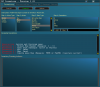
Sneak Peak for Version 1.41.

Trying to streamline the list creation process. Each step is hidden at first and is slowly shown as you make your selection at each step. Full description of Action/Item Types are available in game in a scrolling listbox.

Another page (not created yet) will be where you can create custom item lists (add an item to the destroy list, etc.).

Feedback wanted!


Attachments

Last edited:

bjcasey

ISX Specialist
Broker Buying:

I'm trying to keep broker buying as simple as possible. I have included 9 broker filters in my search options.

Are there any that you feel are not needed?
Are there any that you feel should be included?
Is the information below clear and easily understood?

Description = Buys items from the broker.NOTE: The order of the parameters is very important, but not every parameter isrequired. For those parameters that are not desired, use the word: *Blank*.

Parameter 1 = Item Name
Parameter 2 = Min. Price in copper
Parameter 3 = Max. Price in copper
Parameter 4 = Min. Level
Parameter 5 = Max. Level
Parameter 6 = Min. Tier (Options: Common, Handcrafted, Treasured, Mastercrafted,Legendary, Mythical)
Parameter 7 = Max. Tier (Options: Common, Handcrafted, Treasured, Mastercrafted,Legendary, Mythical)
Parameter 8 = Class (Options: Can be any class or archetype.)
Parameter 9 = Slot (Options: Primary1H, Primary 2H, Secondary, Head, Chest,Shoulders, Forearms, Hands, Legs, Feet, Fingers, Ears, Neck, Wrist, Ranged, Cloak,Charm, Food, Drink)
 

bjcasey

ISX Specialist
Update: Things are coming along nicely. I have completed broker buying and broker placing. Buying is much more reliable and easier to use. Placing has about the same functionality as before, but the behind the scenes code is much improved. I'll be moving to broker pricing next.

Question: How do you want broker placing to handle a broker box being full?
1.Ignore and move on.
2.Increase the broker box counter and try again. This would ignore the broker box you told it to place the item into.
3.Other...
 

bjcasey

ISX Specialist
Update: This is now on my test patcher. I am asking for everyone to ensure that there are no glaring bugs in it while you still have the option of reverting. My current timeline will having me patching to Live this week.

BJInventory-2014.08.01, Version 1.41

  • (BUG FIX) The amenities script should now properly zone out of the large Freeport guild halls.
  • Inventory re-write has begun!
  • My goals with this re-write are to streamline the list creation process in order to reduce the learning curve for new people, reduce the dependency on hard coded phrases and lists by moving them to public files that can be updated by the user (like the BJ Movement set up commands), add functionality in preparation for the coming expansion.
  • THIS IS PHASE 1 OF THE INVENTORY CHANGES. MORE CHANGES WILL BE COMING IN SUBSEQUENT UPDATES.
  • Inventory
    • Added Files:
      • BJInventory_ItemTypes.xml
        • This file contains a list of all of the item types to be used in creating Inventory Action Lists.
    • Changed Location of Files:
      • Inventory Action Lists have been moved from /Character Config/Custom Lists/ to /Character Config/Lists/
      • Custom Lists have been moved from /Character Config/Custom Lists/ to /Character Config/Lists/Custom Lists/
    • Any lists created prior to this patch will not be usable. This change was unavoidable. Sorry for the inconvenience.
    • Create List Page
      • Removed all comboboxes and replaced them with list boxes.
      • List creation now follows a guided step-by-step system with all required information being in-game.
    • Run List Page
      • Expanded the Inventory Contents listbox and added more detailed information about the item, such as, Bag#, Slot# and ItemID.
      • Inventory Contents Listbox and Inventory Running Actions Listbox will now scroll and change text colour as each line is used. White Text = Not Processed, Magenta Text = Currently Processing Line, Green Text = Processed Line.
    • Custom Lists Page
      • Added a new button to the main page that will take you to the custom list creation page. This page will handle all of the custom lists available for use with the @Custom Item item type.
      • There are three types of @Custom Item lists: @Custom Item Name, @Custom Item Type and @Custom Item Description. If you need another way to sort items, let me know.
      • Creation of custom lists follows a simple 4 guided step system where you scan your inventory, select the item you want, click the desired sorting method and when your list is complete... save it.
    • Change Log Page
      • Added a new button to the main page that will take you to the change log. Any action taken by Inventory will be added to this console.
    • Behind the Scenes Changes
      • Okay, first off, I'm really excited about these changes. The code for "most" of the functions now are really steamlined and easy to maintain.
      • All actions now have additional parameters that are provided for you in-game. In some cases, this allows for a greater amount of versatility than previously.
      • With the exception of the Broker Pricing debug information (I'll work on making it better), all of the debug information is really useful and should really help in narrowing down any potential bugs.
      • Broker Buying
        • This function is greatly improved over the previous version both in ease of use and functionality. I haven't found an item yet, that it wasn't able to buy.
      • Broker Placing
        • This function is similar in use to the previous version, but gains the abilities to place anything that can be traded in a bag to a broker box and place any item according to a custom made player list.
      • Broker Pricing
        • This function is similar in use to the previous version, but should be much more reliable on prices. I have added the use of the Extended Veteran Display case, as well as, a lot more debug lines to help narrow things down faster when a bug is encountered. As before, you CANNOT manipulate the broker window while it is scanning, or it will impact your results.
      • Broker functions can now be used from any where in the world. A guild hall is no longer required.
      • Trade
        • This function is exactly the same as the previous version, but with the improved code running it. Additionally, it benefits from the enhanced @Custom Item lists.
      • Vendor Destroy
        • This function has had a big overhaul and has been slimmed down for ease of use. There are no hardcoded item types, but will take full advantage of user created @Custom Lists.
      • Vendor Sell
        • This function is similar to the trading function. Additionally, it benefits from the enhanced @Custom Item lists.
      • Vendor Unpack
        • This function has had a big overhaul and has been slimmed down for ease of use. There are no hardcoded item types, but will take full advantage of user created @Custom Lists. It uses additional parameters to allow the user to unpack almost anything.
 

bjcasey

ISX Specialist
PLEASE write a script to "crunch" potent gear. My bags are full of it and I can't stand crunching it by hand.
This will be available with Patch # 103. I did not do ToV gear because I was unsure the extra work would be worth it to enough people, but all AoM gear will be able to be broken down via the Enchant action.
 
Top Bottom