
Ok sorry to bother you all. This is our 2 account of this wonderful program. our first account seems to run fine they are being run on vista (yuck). The second account is being ran on a win 7 ultimate machine 64 bit. I have read the forums and tried ever fix said. But i am still getting the same error wen trying to load the EXT ISXEQ@ program.
Like I said I have tried everything in this thread
http://www.isxgames.com/HOWTOs/HOWTO-Manually_Enter_ISXEQ2_Sub_Info.html
including the manual
and the ISXFix.exe
Could someone please tell me what we are doing wrong.
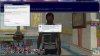
I am uploading the error I am always seeing
thank you for your time
Like I said I have tried everything in this thread
http://www.isxgames.com/HOWTOs/HOWTO-Manually_Enter_ISXEQ2_Sub_Info.html
including the manual
and the ISXFix.exe
Could someone please tell me what we are doing wrong.
I am uploading the error I am always seeing
thank you for your time
Attachments
-
 20.9 KB Views: 155
 and i am still getting the same error i will try to re upload the picture and i will also recreate the proplem and copy and paste it here if the new Image is to small