
Error with
- Thread starter TheDragon
- Start date

Update on this issue.
I deleted the scripts and interface directories from my Innerspace directory and re-copied it from my DVN download directory.
I'm still having the same issue where the toon sits there and turns directions but doesn't move and still getting the same error on startup.
I tried it with the illusionist script as well and getting the same error/results.
Anything else I can try?
I deleted the scripts and interface directories from my Innerspace directory and re-copied it from my DVN download directory.
I'm still having the same issue where the toon sits there and turns directions but doesn't move and still getting the same error on startup.
I tried it with the illusionist script as well and getting the same error/results.
Anything else I can try?
Found something...
Ok... upon doing more testing... I found that when the EQ2 window looses focus for a period of time - I'm not sure exactly how long yet - once you regain focus, the bot can no longer move forward. It appears to turn, but doesn't move forward.
I'm not sure exactly how to correct that. I'm afraid my technical expertise isn't up to the challenge.
Can anyone else confirm that this happens to them? I'm running XP with SP3, if that makes a difference.
Ok... upon doing more testing... I found that when the EQ2 window looses focus for a period of time - I'm not sure exactly how long yet - once you regain focus, the bot can no longer move forward. It appears to turn, but doesn't move forward.
I'm not sure exactly how to correct that. I'm afraid my technical expertise isn't up to the challenge.
Can anyone else confirm that this happens to them? I'm running XP with SP3, if that makes a difference.

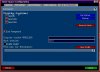
Yes -- right click on the InnerSpace icon in your toolbar and select "Configuration" ...then, click on the tab marked "Game Configuration" and then from the drop down menu select the EverQuest 2 profile that you're using.
Then, on that screen you should see an option for selecting "Lock Foreground" ...click on it.
Here is a screenshot.
Then, on that screen you should see an option for selecting "Lock Foreground" ...click on it.
Here is a screenshot.
Attachments
-
 54.5 KB Views: 134