
cant get isxeve to run now
- Thread starter imeasy
- Start date
"delete innerspace\extension\isdk33\isxeve.dll. copy isxeve.dll from "innerspace\extension " to innerspace\extension\isdk33\. run inner-eve. isxeve autoupdate. then restart eve "
I do not seem to have that particular file in my InnerSpace file. I have "Extensions" and there is a ISXEVE.dll file in there. But nothing concerning a isdk33 anything.
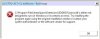
I receive a "Invalid Extension Version. Inner Space is using ISXDK v33, and this extension was built with a different version. To use this extension, you need to download a new version that supports the latest interface.
I can not seem to get the updater to do anything.
Any ideas would be appreciated.
I do not seem to have that particular file in my InnerSpace file. I have "Extensions" and there is a ISXEVE.dll file in there. But nothing concerning a isdk33 anything.
I receive a "Invalid Extension Version. Inner Space is using ISXDK v33, and this extension was built with a different version. To use this extension, you need to download a new version that supports the latest interface.
I can not seem to get the updater to do anything.
Any ideas would be appreciated.
https://www.isxgames.com/forums/threads/6956-UPDATE-November-19-2013?p=42879&viewfull=1#post42879 do this. and this: "delete innerspace\extension\isdk33\isxeve.dll. copy isxeve.dll from "innerspace\extension " to innerspace\extension\isdk33\. run inner-eve. isxeve autoupdate. then restart eve ""delete innerspace\extension\isdk33\isxeve.dll. copy isxeve.dll from "innerspace\extension " to innerspace\extension\isdk33\. run inner-eve. isxeve autoupdate. then restart eve "
I do not seem to have that particular file in my InnerSpace file. I have "Extensions" and there is a ISXEVE.dll file in there. But nothing concerning a isdk33 anything.
I receive a "Invalid Extension Version. Inner Space is using ISXDK v33, and this extension was built with a different version. To use this extension, you need to download a new version that supports the latest interface.
I can not seem to get the updater to do anything.
Any ideas would be appreciated.
