LavishNav for VGCraftBot

Xeon

Active Member
This thread is only for talking about the new LavishNav movement code in VGCraftBot.

Please report all other VGCraftbot problems in the other thread.... Thanks!

If you want to test: you can force an update of the code:

runscript vgcraftbot 1

Notice the 1 at the end. Then run it again normally (without the 1)

Some helpful tips while Mapping
  • SLOW -- go slow, no run buffs, no horses, etc
  • Avoid bad places -- Only go where you would want your bot to path through. Avoid Ropes, low ledges, etc.
  • Make several passes through each area/path
  • Make sure to cover ALL the ground that the wandering Work Order Taskmasters cover. If they go outside, follow them outside.
  • Hit the 'Add Door' button on each side of the door. I suggest a few paces in front of the door, so it has time to get to the server before your toon hits the door. Feel free to do this several times on each side of the door as you move closer to it.
  • Hit Supply NPC, Repair NPC and Crafting Station add buttons when you are pretty close (but not on top of) your target
  • Pick a place where your bot can always move to without looking silly when picking the 'WO NPC Search' spot. The bot will always move here before pathing to the Work Order Taskmaster. The bot will also wait here if it can't target/path to the Taskmaster.

A Note on the 'WO NPC Search' spot: If your wandering Taskmaster NPC is always within radar range, then just set the search spot at your crafting table. The bot will then just path directly to your WO NPC.

Right now you have to make a a new 'path' each time you want to do a different type of recipe (Finish/Refine) but it actually uses the same LavishNav XML map file, it just adds/changes the target points in the file.

Test away!
 
Last edited:

Xeon

Active Member
How to Map the area

How to Make a Map of your crafting area:

Once you hit New Path and enter the name, simply start running around to all the different places (Crafting Station, Work Order NPC, Supply NPC, Repair NPC) that you will want your toon to move. You are creating a Map of the area you move through, so that your toon knows what areas it can move through.

The more often you get all the auto-mapped boxes/paths to self connect, the better your pathing will be. If your Work Order Taskmaster wanders around, I would suggest following it around and make sure you cover all the places that it goes.

Once you have traced out the path a few times, the start to do the old routine:

Start at Crafting Station, select and hit 'Craft Station' Button
Move to a spot that you have Radar range to your Work Order NPC, then hit the 'Search WO NPC Spot' button.
Select your Work Order NPC and hit the 'WO NPC' button
Move to your Supply NPC and hit that button.

If there are any doors in the way, be sure to hit the 'Door' button a few times leading up to the door (both sides!)

If your pathing isn't working like you want it to, then 'pause' the script, check the 'Mapping Mode' checkbox and run over the paths again to build up the connections.

EDIT:

Wanted to add a huge thanks to Bohika for his LavishNav mapping code
 
Last edited:

MstrGareth

Active Member
Once mapped, does it need to be remapped everytime we need to make a new path in that area?

Or will the refine path, reuse mapings from finishing path if available?
 

Xeon

Active Member
MstrGareth said:
Once mapped, does it need to be remapped everytime we need to make a new path in that area?

Or will the refine path, reuse mapings from finishing path if available?
Right now the 'map' is just added to each time you create a new Path.

However, the 'paths' contain the Name of the Crafting station, Work Order Taskmaster and Supply NPC, so you have to make one for each type.

I'll be working on changing the code so that you can define all of them at once, then just switch between Finishing and Refining
 

gp1001

Active Member
MstrGareth said:
Once mapped, does it need to be remapped everytime we need to make a new path in that area?

Or will the refine path, reuse mapings from finishing path if available?
He may have edited hos post after you posted not sure.

Xeon said:
Right now you have to make a a new 'path' each time you want to do a different type of recipe (Finish/Refine) but it actually uses the same LavishNav XML map file, it just adds/changes the target points in the file.
 

gnits

Active Member
Ok, i have managed to get it to do what i need and it does look a lot like someone is driving the bot, but i do tell it the repair person, what makes it go repair, is there a threshold for that?
 

thezig

Active Member
The new system is very nice, it does look like there's a person controlling it. However, I have one difficulty. I ran the proper path several times (which requires navigating around a tent right next to the station), and saved the path.

The bot can run well between the supplier and station, and between the WO npc and the station, but not between the station and the NPC.

If that damn tent is between the WO npc and the station when the bot decides to get more orders, it'll blindly run into the tent like a moron until the NPC moves to a better spot or I guide it myself. None of my paths take me through the tent, and my "wait" position is in a spot that would avoid obstacles, but the bot doesn't seem to want to go there.
 

gnits

Active Member
Reminder for Xeon. Navigation system should be able to start from anywhere within the points recorded from path mapping.
 

gp1001

Active Member
I have an issue where when getting fuel from the supllier npc it follows the path but actually passes the supplier then stops pauses turns then gets supplies.
When returning to the station it doesnt quite make it, then inches forward and if that doesnt work it turns around walks back a couple of feet and tries again. Is there something i should try with path precission or target precission? Currently it is at the default 120 / 3.

Thanks!

***Edit***

I ended up deleting the Lavishnav location file located in C:\Program Files\InnerSpace\Scripts\vgcraft\vgpaths\
and started from scratch, making sure to only navigate where i wanted the bot to go specifically around the npc's and the station and it worked like a charm.
 
Last edited:

thezig

Active Member
As a follow-up to my earlier post, the AI seems to be completely ignoring the wait point. It'll try to go directly from the station to the work order npc (despite the pathing I showed it when I created the path), which invariably causes my character to run into the side of a tent for several seconds.
 

gnits

Active Member
Additional Note: You must save a path, even a temporary path to add additional points to the nav system. not sure if this is intentional.
 

PappaSmurf

Active Member
Tuche said:
does not seems to be adding extra components to the table.
Try adding the extra ingreds to the list. To do this, go to the "Items" tab and add them in the Extra Ingreds section.

P.S. Xeon, the navigation is working very well for me. Very nice job and mucho thanks!

-- PappaSmurf
 

Xeon

Active Member
New code -- force an update

Ok, I've changed the way that you set the Targets for Crafting Station, WO NPC, etc.

Please force an update: runscript vgcraftbot 1

And let me know if there are any problems or you have questions.

Well, I'll answer the first one:

How to Create a Map


On the Move Tab run around with Mapping Mode checked. As you run around to the different points, set your Craft Station, Work NPC and Supply NPC.

Be sure to run to all points that your Work Order NPC will cover, so you have a good map of the area.

Also be sure to do it for both Finishing and Refining. If you only do one, you can simply click the Mapping Mode later and add the other targets.
 

dazed0119

Active Member
So with this new release we can only have 2 paths? one for refining and one for finishing? I see no options for saving.

Also, what are the possibilites since we now have 2 paths set up, to have it alternate between finishing and refining or something to that effect? is that even doable?
 

thezig

Active Member
The simplification you introduced is great, but my character is still getting stuck inside tents and such. This only happens when dealing with the WO npc. Once it targets the npc, it will beeline to it and get stuck if anything's in the way. It will also do the same thing on the way back to the station *if* it does not go to the supplier first.
 

Xeon

Active Member
thezig said:
The simplification you introduced is great, but my character is still getting stuck inside tents and such. This only happens when dealing with the WO npc. Once it targets the npc, it will beeline to it and get stuck if anything's in the way. It will also do the same thing on the way back to the station *if* it does not go to the supplier first.
Yeah, I need to do more path checks for the moving WO NPC's.

For now be sure to check Mapping Mode and run around those tents, so that it has pathing information for getting in and out of them.
 

Xeon

Active Member
dazed0119 said:
So with this new release we can only have 2 paths? one for refining and one for finishing? I see no options for saving.

Also, what are the possibilites since we now have 2 paths set up, to have it alternate between finishing and refining or something to that effect? is that even doable?
Get rid of the idea of paths, there are no more paths.

Now there is just a map. A map with points on it. A crafting point, a Supply NPC point, etc.

Currently the map is created when you move around with the Mapping Mode checked. As you move around, it maps out the area your toon is allowed to path through, so be sure to move everywhere your toon might have to go.

You can switch between Refining and Finishing with a simple click of the checkbox. Set both up with the correct targets (Crafting Station, WO NPC, etc) and try it out.

You don't even have to stop the bot to switch :evil:
 

diraven

Active Member
Xeon said:
Get rid of the idea of paths, there are no more paths.

Now there is just a map. A map with points on it. A crafting point, a Supply NPC point, etc.

Currently the map is created when you move around with the Mapping Mode checked. As you move around, it maps out the area your toon is allowed to path through, so be sure to move everywhere your toon might have to go.

You can switch between Refining and Finishing with a simple click of the checkbox. Set both up with the correct targets (Crafting Station, WO NPC, etc) and try it out.

You don't even have to stop the bot to switch :evil:
Will we be able to save Maps? Basically Lets say I want to do some crafting in Khal for a while, then I run to another spot for some grinding like Ahgram (spelling) then maybe back again, Or if I decide to faction/money grind in a whole other continent? Basically the ability to save Khal Finishing and Khal Refining maps, then moving on to other cities, but being able to return without having to remap.
 

aChallenged1

Active Member
It should, if the mapping has been setup to do it, allow you to map the new area, just like the previous one that you set up using the new mapping system, and then set up the station points for the various merchants, tables, and WOGivers there.

I'm sure the mapping portion will work. I'm not sure about the points for the stations, merchants, etc.
 

gnits

Active Member
whats really fun about this, is i had mapping turned on while i went all over ahgram. I just went walk-a-bout to look for things. I had been in the middle of a session. Saved my temp path and switched back to my old path and hit resume.


It walked me from the palace to the crafting area and went straight to the work order npc. Excellent. I wonder if i can make this happen from across a chunk!

It's worth an experiment.
 

aChallenged1

Active Member
gnits said:
It walked me from the palace to the crafting area and went straight to the work order npc. Excellent. I wonder if i can make this happen from across a chunk!

It's worth an experiment.
It should work across chunks.
 

Zamu

Well-Known Member
Infinite loop

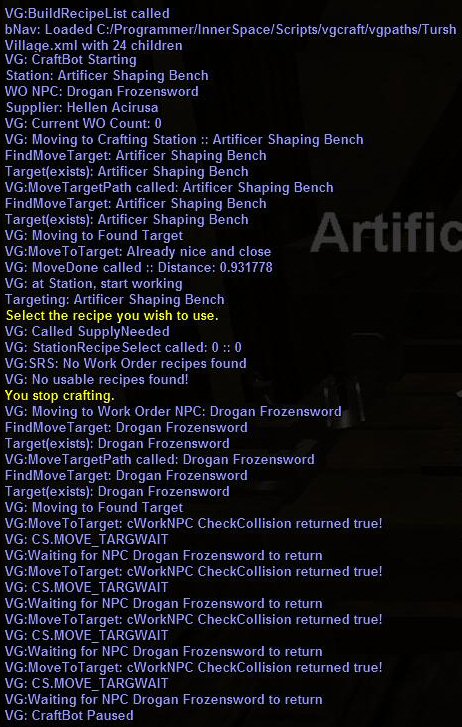
The craftbot worked fine for me when it was paths, but now it runs an infinite loop when trying to find the WO NPC (See screenshot with debug messages)

I am crafting in Tursh and the WO NPC is on another level up some stairs, he isn't moving anywhere.


Zamu

Well-Known Member
Yes, I went up the stairs and made doors. When that loop occurs my char is still standing at the workstation which is pretty close to the WO NPC in X,Y coordinates. He doesn't move at all, it's as if it thinks it's close enough already.
 

Xeon

Active Member
Zamu said:
Yes, I went up the stairs and made doors. When that loop occurs my char is still standing at the workstation which is pretty close to the WO NPC in X,Y coordinates. He doesn't move at all, it's as if it thinks it's close enough already.
I don't track Z location, so yes that would be a bug in the code.

I'll have to think about that for a bit....
 

Xeon

Active Member
diraven said:
Will we be able to save Maps? Basically Lets say I want to do some crafting in Khal for a while, then I run to another spot for some grinding like Ahgram (spelling) then maybe back again, Or if I decide to faction/money grind in a whole other continent? Basically the ability to save Khal Finishing and Khal Refining maps, then moving on to other cities, but being able to return without having to remap.
Right now the script saves each pair of settings with the Chunk name, which is also the same as the 'map' name.

However, I don't check while the script is running, so if you move chunks (from Khal to Agrahm) then you will have to stop/start the script before it detects the change.
 

gnits

Active Member
Changing zones without a file created does not create a new file, it simply stops mapping, sorry chunks, i mean.
 

gnits

Active Member
gnits said:
Changing zones without a file created does not create a new file, it simply stops mapping, sorry chunks, i mean.

Can someone adapt this so that i can run this in script mode to start mapping out the cow paths? Without having to save a new path, with out having to create a new chunk file every time i chunk?

(sad, they dont call it zoning, they call it chunking, but a rose by any other name...)
 

aChallenged1

Active Member
A properly done script making use of LavNav's features should automatically create a new region each time you chunk and add subregions as you go. There is no reason for it not to be able to deal with chunks/zones, because Lax specifically created Lavish Navigation to be able to deal with such issues.
 

Warmech

Active Member
How come when I set up the vgcraftbot, set the station, the repair man, the NPC WO guy, I mapped it all out by running the paths a few time....with the map thing checked....but when I start the bot he doesn't do anyhting.....he just stands there
 

Xeon

Active Member
Warmech said:
How come when I set up the vgcraftbot, set the station, the repair man, the NPC WO guy, I mapped it all out by running the paths a few time....with the map thing checked....but when I start the bot he doesn't do anyhting.....he just stands there
Why are you posting the same question in 3 fucking threads?

Stop that!
 

Paardje101

Active Member
Has anyone been able to make a good working path in Martok Refining ? I first ran along the path alot of times in mapping mode, but still when he must go to the supplier in the little house, he doesn't follow the path I did, he just targets it and tries to run to him in a straight line, obviously missing the door and running into the wall of the house, also getting out doesn't work. Anyone have any tips?
 

aChallenged1

Active Member
I'm wondering if we should mark doorways (that are doorless) as "doors" when making paths. Maybe that would fix the issue. I don't know.
 

djvj

Active Member
I think what this needs is for it to NEVER deviate from the path we set up. I am constantly getting stuck now with this last update. All the bot wants to do is beeline it to things. Used to be able to run it for 10 hours straight, now i cant take my eyes off of it for an hour.

I have not been able to set it up at any outposts due to the taskmasters always pathing through objects that gets the bot stuck. I never ran through these objects and the bot shouldnt try to.
 

fancy

Active Member
OK I have the right thread now. What I did was totally deleted the path from the vgpath folder from my scripts folder. Once I redid all the mapping it works like a charm. Unfortunately still have the door issue where it won't open and you just run into it. If you find an area with no doors you'll be fine. Atleast you can run the bot.
 

thezig

Active Member
I'm still having problems with it running into things, especially fences. If it's close enough to a mapped point, it'll try to get there even if there's something in the way.

If I understand the pathing method correctly, it looks at all of its points and creates a path by linking nearby points that lead to its target. Would it be possible to have it place points more frequently and lower the distance that points can be connected for a path? If that's the way it works, then this change would force it to path around objects instead of trying to run through them, since it would be harder for it to find 2 points that are close enough to connect *and* have an obstacle in the way.
 

djvj

Active Member
You definately cannot run this anyplace with doors, it just never opens them :(
That and beelining is my biggest issues with the navigation function. I would post logs, I don't think you need them though.
 

Xeon

Active Member
New release should now open doors.

When it's running the route you have laid out, just spam the Add Door button as you get close to it. Remember to do this on both sides.
 

djvj

Active Member
Sweet, doors work ok now, thanks!! Just took a few mapping retries. Seems that if the crafting table is up against a wall, and you path in the opposite side of that wall, the bot thinks that it can use the table on the wrong side of the wall. It doesn't realize that it has to go around, through the door first then run to the table. Had to make its path further from the wall for it to go correctly through the door first. Starting the bot outside a building with doors, first thing bot does is target the table and beeline to the table inside, ignoring all pathing :(

I'm getting alot of errors now like so:

VG:ERROR Could not find a Path to Artificer Sculpting Table
VG:ERROR MovePath could not find a Path to Artificer Sculpting Table
VG: No Path to found, pausing
VG: Stuck in a path loops! Pausing

When I'm standing right in front of the table....It will even run all the way back through doors into the room with the tables and end with that error. Remade the paths 3 times now. I can start the bot right in front of the table and instantly give that error too.


13:42:51::VG: CraftBot Paused
13:42:56::VG: CraftBot Resumed
13:42:56::FindMoveTarget: Artificer Sculpting Table
13:42:56::VG: FindMoveTarget: Pawn:Target(exists): Artificer Sculpting Table
13:42:56::VG:MoveTargetPath called: Artificer Sculpting Table
13:42:56::bNav: X: -21846.000000 Y: -61590.000000 Z: 13318.804688
13:42:56::bNav: Names: 19 :: 19
13:42:56::bNav:MovetoTargetName: Found Path to auto-4620EA8E-1 with 0 hops from auto-4620EA8E-1
13:42:56::VG:ERROR: Could not find a Path to Artificer Sculpting Table
13:42:56::VG: No Path to Artificer Sculpting Table, try UPATH
13:42:56::VG: MoveAlongPath called
13:42:57::VG: Move to Crafting Station: Artificer Sculpting Table
13:42:57::VG:MovePath called: Artificer Sculpting Table
13:42:57::bNav:MovetoWP: Found Path to auto-4620EA8E-1 with 0 hops from auto-4620EA8E-1
13:42:57::VG:ERROR: MovePath Could not find a Path to Artificer Sculpting Table
13:42:57::VG: No Path to found, pausing
 
Last edited:

Smyrk

Active Member
I'm having pretty much the same issue as djvj with the newest release. When attempting to run to any of the NPC or stations it has a tendency to run to the furthest point away from them and then spam that it has no Target to move to or can't find a specific NPC and pauses the script. Furthermore, if I manually pause the script and run to the location of the station or necessary NPC, it runs BACK to the point where it can't find them in the first place and again spams that there is either no path or LOS or target. The paths I am using were all working perfectly before this mornings push of the scripts.

I additionally went and deleted the previous XML for the paths I was trying, and attempted to create new ones... I get the same issue on multiple toons in multiple locations. Are there any other files I should delete or anything I should tweak to attempt this again to fix it?

Oh, I also noticed that rather than smoothly pathing along, as it trys to get to that furthest out point, it is now erratic, going in loops and jerking back and forth seemingly at random. It looks very odd watching it.

I realize all of this could be specific to my configuration, however it is somewhat frustrating that it was all completely functional before the push.
 
Last edited:

bohika

Active Member
If you are having trouble with doors try running in 1st person view. usedooretc seems to be based off of camera position.
 

gonemental

Active Member
Code:
00:45:41::VG: Moving to Crafting Station :: Artificer Shaping Bench
00:45:41::FindMoveTarget: Artificer Shaping Bench
00:45:41::VG: FindMoveTarget: Pawn:Target(exists): Artificer Shaping Bench
00:45:41::VG:MoveTargetPath called: Artificer Shaping Bench
00:45:41::bNav: X: -82243.000000 Y: 47297.000000 Z: 1433.378418
00:45:41::bNav: Names: 3 :: 3
00:45:41::bNav:MovetoTargetName: Found Path to auto-4621BAA4-0 with 0 hops from auto-4621BAA4-0
00:45:41::VG:ERROR: Could not find a Path to Artificer Shaping Bench
00:45:41::VG: No Path to Artificer Shaping Bench, try UPATH
00:45:41::VG: MoveAlongPath called
00:45:42::VG: Move to Crafting Station: Artificer Shaping Bench 
00:45:42::VG:MovePath called: Artificer Shaping Bench
00:45:42::bNav:MovetoWP: Found Path to auto-4621BAA4-0 with 0 hops from auto-4621BAA4-0
00:45:42::VG:ERROR: MovePath Could not find a Path to Artificer Shaping Bench
00:45:42::VG: No Path to found, pausing
I am clicking refining tab checking mapping running around setting up all of my npc's and benches. I come back to the bench and turn off mapping. I restart the script and then starting the script in automatic mode and I get the message above. I am practically standing on the bench I flagged as my crafting station.
 

Karye

Active Member
I havnt looked at the code but from using it...... It seems two things invalidate a region, location, path whatever you want to call it. Getting stuck on the way to a location or being 0 hops from the location when starting.

Every time you get stuck you need to remap the area and Targe tLocation ie craft station or vendor. This is most likely by design? Although if shared/public maps are used eventually. This will need to be handled differently.

When starting vgcraftbot its best to be somewhere at least 1 hop away, ie not right near the craft station, supply merchant, repair merchant, or workorder wait point. This is most likely a bug.
 

Mr.DK

Active Member
Xeon said:
New release should now open doors.

When it's running the route you have laid out, just spam the Add Door button as you get close to it. Remember to do this on both sides.
You mean:
- Set up path, without klicking on the door button
- when bot is running the path, hammer the "Add door" button ?

This doesn't work. The bot didn't open the door.
 

aChallenged1

Active Member
Might want to ensure it's in mapping mode when you're heading towards a door. But, that's my thinking based on the belief (I'm not sure) that it will not save the door information if it is not actively mapping.
 

gp1001

Active Member
Mr.DK said:
You mean:
- Set up path, without klicking on the door button
- when bot is running the path, hammer the "Add door" button ?

This doesn't work. The bot didn't open the door.
No, what he means is while you are in mapping mode creating your route spam the add door button when approaching and while you are on the other side of the door, this makes the path have door info on both sides when you return to the door on the route back. Make sure you are in 1st person mode also. I havent been succesfull getting the doors to open in 3rd person view.
 

Mr.DK

Active Member
I solved the problem, i think.

In Ahgram stands the utilitysuplier near the door, where i 've to go in to craft.
Walking in the room works as intended. But when the bots want to buy utilities, he doesn't open the door. I guess, thats the bug. 5m away he targets the utilitysuplier and doesn't "see" the door, thats in his way.

I solved this by setting up another workstation, which is not behind the suplier.
Well, i think, Points of Interrests should not be to close together (i.E. doors to use, suplier, taskmaster), then the bots runs fine.

Edit: And by the way. I only set one doorpoint on each side of the door and it works!
 
Last edited:

Andykay

Active Member
A quick pathing issue. I've noticed sometimes if you run to where the taskmaster is, and he starts moving before you get there, then it can cause issues. This is most obvious when he goes outside a tent or door or something. You go to the spot where he was, stop, then turn and try to path directly to him since he's only a short distance away. This usually results in you running into a wall and continually trying to interact with him for a little while, which looks really sus.
 

fancy

Active Member
Having a minor problem no big deal might even be fixable on my side who knows. When I go to the craft table the bot always used to center me up and face the table. After the patch on Wednesday this doesn't work any longer. I can still craft not a big deal but if coming into the station a certain way kinda like I am I am standing at the table sideways. Anyone else notice this?
 

aChallenged1

Active Member
fancy said:
Having a minor problem no big deal might even be fixable on my side who knows. When I go to the craft table the bot always used to center me up and face the table. After the patch on Wednesday this doesn't work any longer. I can still craft not a big deal but if coming into the station a certain way kinda like I am I am standing at the table sideways. Anyone else notice this?
Notice it, no because I haven't used it in full bot mode. We asked recently (in the other thread, I believe) to have it not face center of the crafting table, but rather check to see if it was within a certain number of degrees of center, and if so don't "face". Perhaps the check needs to be a little narrower, as in 45 degrees left or right of center of table. Seems it's checking 90degrees each way instead.

Personally, I think this is on the crafting side of the bot, and not the movement side.
 

fancy

Active Member
I agree with your 90 degrees thats about how i would say I am facing. I would think 45 degrees would look a little more realistic. Just my opinion though.
 

Xeon

Active Member
fancy said:
I agree with your 90 degrees thats about how i would say I am facing. I would think 45 degrees would look a little more realistic. Just my opinion though.
yes, the next release should be better about that
 

mordacai

Active Member
As a rule I always try to path my bot so its facing the table/WO npc/ Utility npc at the end of the path , The turn to face the table thing sticks out like dogs balls and screams BOT, Try remapping your path so it runs straight up to the table and comes to a halt at a resonable angle.
 

fancy

Active Member
Yeah I have tried that doesn't seem to work to well for me. Might be because my supply npc is very close to my table, but I still can't get it right. Thanks for the update thats its being worked on Xeon.
 

spudman

Active Member
<EDIT> Outdated, see later post with updated features, etc.

I used an excel spreadsheet to visually map a few of my nav files just for sanity checks, etc. Figured I'd post here in case anyone else is interested.

The attachment is the excel vba code to map out your nav file in 2D.

Quick instructions (I'm using excel 2k, so adjustments may be needed for other versions)
1) Open excel (start with new sheet and be sure macro's are enabled)
2) Add a command button to the sheet (need to see control toolbar - View -> Toolbars -> Control Toolbox)
3) Add a rectangle to the sheet (need to see drawing toolbar - View -> Toolbars -> Drawing - rectangle is between arrow and circle)
4) Unclick the design mode button on the control toolbox (ruler/triangle/pencil button - so that it's not depressed)
5) Go to VB Macro's (Tools -> Macro -> Visual Basic Editor)
6) reference MS XML (Tools -> References - scroll down and check one of the Microsoft XML, vx.0 - I used v4)
7) Open up Sheet1's module by double clicking Sheet1 in the VBAProject Tree on left
8) Past the code in the text file into that module
9) Change the xmlDoc.Load line to reflect the proper path to your chunk file.
10) go back to the main excel sheet and click the command button.

It should resize the rectangle you created and plot green squares where your navpath 'boxes' are.

North is up, West is left, etc. so you can kind of use that as reference

If you have problem with this, PM me since it's kind of off topic.
 
Last edited:

spudman

Active Member
I've also fixed various issues that I've had with the nav code in vggraftbot, partially outlined here...

Some of the items I've adjusted are...
1) removing named points for vendors, taskmasters, etc, since it's possible for you 'not' to be in mapping mode when this is done and therefore it can create these points without connections, meaning bnav will find the named point as the 'best point', but no way to path to it, which in turn leads to it running all over sometimes.

2) removing some of the code that tries to b-line to an object rather than force it to run through the path files. This caused problems for me when the script 'thought' it should just walk straight to the target, when in fact there were walls or something else in the way (benches, etc) and if it just follows the nav path it would be just fine.

3) making the default box sizes smaller - I think bohika's original intent for his nav object was for hunting, where you would want bigger boxes, but for the areas i've been crafting in I'd rather have smaller ones to be more precise and less likely to overlap walls, etc.

4) moving to station locs instead of 'nearest' station (outlined in linked post above)

If you're having any of these problems, PM me for the code changes if you want them, or if everyone wants I can post them all here.
 
Last edited:

spudman

Active Member
Few requests for these and since I can't send attachments in PM's, here are some fixes to the issues above if you want to try them.


1) Removing named points.
- I did these because you can set the Station/WO/Supplier without being in mapping mode and 'where' the station/supplier/etc. is at that time, they might not fall into a navigable region. When this happens it simply creates the named point as a child of the 'chunk' with no connection to anything. So when bNav tried to find the nearest region to the given station/supplier/etc it would find these 'named points' as the closest regions, but with no path to them. This, in turn, kicked off various other methods to 'try' and find the person/station,etc., usually a direct run to that person, but more often than not it screwed up for me.

Code changes...
In craft-uilogic.iss search for any line that says
Code:
call AddNamedPoint "${blahblahblah}"
and just comment it out...
Code:
;call AddNamedPoint "${blahblahblah}"
Don't actually search for blahblahblah, it's going to be one of several items, so just search for "call AddNamedPoint".

I don't believe the named points are necessary anymore since we are using Pawn searches/locs anyway to find the people/things we are looking for. Xeon can correct me if I'm wrong. If your working in a fairly contained area (which you most likely are doing crafting), these changes shouldn't be a problem and even if you are covering a lot of ground, if the script doesn't find the Pawn it's looking for it will simply move to it's loc, which should work fine.

Once again you should recreate your chunk nav file if you implement this, or else remove named points from your xml file. Your nav file is in vgcraft/vgpaths/chunkname.xml. Delete it and then run vgcraftbot again, you'll start up in mapping mode even though the check box is not checked.
 

spudman

Active Member
2) removing some of the code that tries to b-line to an object...
In bNav, when it moves, it checks to see if it's already in the 'best fit' region and if it is, then it just moves straight to the target, however I've had several times where it ends up thinking it's in the best region, when it's not. I didn't test a lot to see 'why' i just removed the code that checked this and forced it to run 'best path' every time. I was thinking this was related to my code that moves to station loc's instead of 'nearest station', but it was doing it for vendor's too. Trying to run through walls or running into tables.

In craft-bnavobjects.iss, search for the words "In region quick hop", you'll find two instances of it and the code looks similar to the following:
Code:
		if ${This.CurrentRegion.Equal[${LNavRegion[${Me.Chunk}].BestContainer[${Pawn[${aTarget}].X}, ${Pawn[${aTarget}].Y}, ${Pawn[${aTarget}].Z}]}]}
		{
			call FastMove ${Pawn[${aTarget}].X} ${Pawn[${aTarget}].Y}	${movePrecision}
			call DebugOut "bNav:MovetoTargetName In region quick hop"
			return "END"
		}
all your going to do here is create a line before and after this code section. On the line before put '/*' and on the line after '*/'. Your just commenting out this code so it doesn't run.

Code:
/*
		if ${This.CurrentRegion.Equal[${LNavRegion[${Me.Chunk}].BestContainer[${Pawn[${aTarget}].X}, ${Pawn[${aTarget}].Y}, ${Pawn[${aTarget}].Z}]}]}
		{
			call FastMove ${Pawn[${aTarget}].X} ${Pawn[${aTarget}].Y}	${movePrecision}
			call DebugOut "bNav:MovetoTargetName In region quick hop"
			return "END"
		}
*/
remember there are 2 instances of this!
 

spudman

Active Member
3) making the default box sizes smaller
This item is entirely preference. I think Xeon actually reduced the box size in .9999 version already, so not sure what it's default is now, but I made my box size fairly small so that as the nav system automatically mapped boxes it wouldn't overlap them onto walls, etc. The smaller you make it the 'more' boxes it will create and hence more memory used, etc., but honestly our 'crafting' maps are still fairly small.

In craft-bnavobjects.iss search for "method AutoBox()", inside this function you'll see...
Code:
LNavRegion[${This.CurrentRegion}]:AddChild[box,"auto",-unique,${Math.Calc[${Me.X}-300]},${Math.Calc[${Me.X}+300]}, ${Math.Calc[${Me.Y}-300]}, ${Math.Calc[${Me.Y}+300]}, ${Math.Calc[${Me.Z}-50]},${Math.Calc[${Me.Z}+100]}]
or something similar. reduce the 300's (or I think Xeon's latest had 150 in there) to whatever suits your preference. I currently have them at 50 myself, but that's probably a little too small. The code is simply creating a box around ourself by taking our loc and adding 300 to one side and removing 300 from the other. So in effect if those number are 300, it creates a box 600x600x150 (don't play with the Z coord). 300 equates to a 3 reading on your target distance indicator. When i changed them all the 50, i'm then creating a box that's 100x100x150, if xeon's latest code has 150 in them, then it's a 300x300x150 box.

If you change this you will 'have' to redo your mapping for a given chunk. Smaller boxes help it navigate better through doors, etc. as well.
 

spudman

Active Member
Also wanted to add some general info that I learned about 'how' this thing creates paths, since that helped me GREATLY to make a good map file of areas. With the changes outlined above and a good navpath file my bots are rocking.

If I haven't said it already great work Xeon, really appreciate everything you've done. 99% of my issues with this were regarding navigation and I think i've managed to tackle most of those at this point.

Re: mapping.
1) There's a bug where if a chunk file doesn't exist, it starts you up in mapping mode, but it doesn't automatically check the 'mapping' checkbox on the UI. This can be confusing and is also the reason that when you start the script in a new zone it yells at you to 'finish mapping first' when you click start. Easily fixed by clicking and then unclicking the checkbox for mapping mode.

2) I HIGHLY suggest you turn on debugging while mapping so you can see when boxes are added. I also suggest you go to crraft-bnavobjects.iss and look for the 'AutoBox' method. Toward the end of that procedure make this change...
Code:
			LNavRegion[${CurrentRegion}]:SetAllPointsValid[TRUE]
			[B]call DebugOut "bNav: CR:${CurrentRegion}"[/B]
		}
What this will do is debug out the auto generated name of the box. The default debug msg just says it added a point to the current chunk, but once your screen fills up with those msgs it's hard to tell when it's really adding boxes or just sitting there. This msg is unique for each box, so you'll always know when new boxes are added.

3) VGcraftbot - LavNav mapping 101 - your map is broken down into 'boxes' and 'connections' amongst those boxes. When mapping mode is on it works like this, It checks if your current location is contained within a box, if it is, fine, if not it creates a new box based around your current loc and attaches it (connects it) to the last 'box' you were in. Connections are created anytime you move from one box to another and connections are created 2 way.

3a) So what does this mean? It means to map an area nicely you should run across it from all directions. i.e. in a general area, run N/S around the area, then run E/W around the area to create cross connections of the boxes, then run diagonally SW/NE and SE/NW. This will create a nice 'mesh' of connection that happen in all different directions and help make your bot run paths more realistically.

3b) The mapping doesnt' take into account jumping, etc. so basically don't do it. Keep a few feet away from fences and other obstacles so that boxes don't overlap them and then the bot thinks it can traverse them. NEVER jump over a fence in mapping mode, since it WILL connect boxes on both sides and think that it can walk right through it.

3c) Pathing vs. moving to an object. There's actually 2 phases to pathing in vgcraftbot (I think! - xeon can correct me if i'm wrong). 1st is navigating the map to get to the closest 'box' to a target, 2nd is getting within the 'target precision' of that target once you are close. This means you don't have to map right up next to a target. You can map close to it, such that there's no obstacles in your way to the target, then the 1st nav portion will get you 'close' then the 2nd nav portion will move you to the object.

4) Doors/Tight spaces - This is where I really suggest you do #2. Then you can see when a new box has been added. Doors are a property of a given box.

4a) If you're dealing in tight spaces and doors you may want to consider following the post above where i explain how to reduce the default size of the autobox function.

4b) When dealing with a door, first make sure you are connected to your 'mesh' by running around the area outside the door a little bit in mapping mode. Then align yourself with the door and move slowly toward it until you see the debug msg that a new box has been added. Once you see that the new box has been added, hit the add door button. This will add the 'door' property to the box. Now move slowly toward it some more and when you see another box added, hit the add door button again. Keep doing this to every new box that it adds while going through the door. What the script does is while traving boxes that have the 'door' attribute it spams the 'usedooretc' function of VG. So it's somewhat important to have all your boxes both leading into and away from the door to have the 'door' attribute (because connections are made both ways).

4c) I would not map my way back through the door once I've got it mapped once. Personally, once I map a door I turn mapping mode off when i come back through it. This is because i want one and only one way to get through that door and that's the original way i went through the door. If I leave mapping mode on, it's possible it will add more boxes on the return trip and if i'm not paying attention those boxes won't have the door att. Edit - Found a problem with turning mapping mode on/off - when you turn it back on, it will connect you to the last point you were in when you shut it off. See here to see some code to fix it till Xeon puts a fix live (if he decides to).

4d) Related to 4c, tight spaces. Sometimes crafting stations, etc. are locating in some pretty tight spots inside buildings, etc. I take a similar approach to these as i do to doors. I run one single path VERY SLOWLY through the tight spaces and then i turn mapping mode off. In tight spaces I don't want a big mesh of a map, I want essentially a straight line that he will follow every time. If I leave mapping mode on it can take the chance of adding unwanted boxes/paths that I don't want to have when having to a) go through a door to a building, then b) navigate sharp corners to c) get to a crafting station that's in a tiny cubbyhole. If even one connection is accidentally made through a wall, it will hose the bot. so run the path ONE TIME and turn mapping mode off, then go back to meshed area and turn it back on.

5) If you have excel and you're having map issues I suggest you use the previous post i had that will map out your paths in a visual form, so that you can see where your boxes might be lacking, etc. If the code runs into an error, it's probably because a box doesn't have a connection, or there is a named point or something that is connected to the chunk, rather than to a box. Both are bad situations and I would recreate my nav file.

Anyway, hope this helps out with pathing and feel free to correct any mistakes I made.
 
Last edited:

eaglepigjim

Active Member
Thanks spudman, I havent had a chance to look at this yet because Ive been working on my botcommander program all the time.

Do you think it migh be possible to post or send some of the perfected maps you've made?

What might be really nice would be if we could get perfected lavishnav maps for each crafting zone added to craftbot, so that people dont have to make one themselves each time.

Also great job on the excel program, I saw where a lot of my problems were in certain zones using that especially Fisher's Pen which is an absolute nightmare for pathing. I have a pretty good BC map which I will perfect with yuour technique, but the nearest repair person is miles away making it a tougher proposition so I normally repair manually.
 

spudman

Active Member
Funny, I am just working on posting an updated excel file. This one should be a LOT better, including allowing scaling, drawing connections and doing error checking (and coloring bad boxes orange or red). This version has allowed me to find LOTS of errors in various pathing files I had.

As far as posting maps, I won't do that, simply because then everyone would path identically. (Think of 3 bots all scrounged into the same identical spot around a crafting table). If someone else wants to that's fine, but I'd rather provide the tools to make good maps and then let people go from there.

New excel file coming soon.
 

spudman

Active Member
Updated mapping program in excel. I looked at doing this in some other more generally available program, but it would then probably have to be graphics based or something else (if people have suggestions I can look at doing it in something else). At work we are an MS shop, so this worked out easiest for me. Plus the boxes and connections are objects on the spreadsheet, so if you see a bad one, you can select it on the spreadsheet and see the name of that box in the control dropdown (upper left), which then makes it easy to find in the xml file to correct.

I'm posting the actual spreadsheet this time (hopefully i got rid of most of the metadata), and also the module and instructions if you want to create it yourself. (I wouldn't trust other peoples macros without looking them over either).

Basically click the command button and follow the instructions.
a) it will prompt for your navigation map xml file (these are located in scripts\vgcraft\vgpaths)
b) it will ask for a scale value (10 is default, lower makes bigger maps, higher makes smaller maps)
c) after mapping, if there are orphaned points it will tell you
d) after mapping it will ask if you want to draw connections
d2) it will ask if you want arrowheads on connections.

Key:
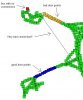
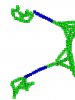
Green box : everything appears to be ok
Orange box : door points that something isn't right on (it's possible named points such as taskmasters, etc will show up as orange - this isn't a big deal)
Blue box : proper door points
Red box : conneciton issue - usually no connections or orphaned boxes

There's screenshots of a portion of my leth nurae map with problems and then fixed. How to fix most/all of these problems are contained in previous posts in this thread or in posts on the vgcraftbot thread.

<EDIT> If you set this up manually, IGNORE step 9, you don't need to change any of the code anymore
 

Attachments

Last edited:

dazed0119

Active Member
once again great stuff spud, but my problem is my path file has like over 1k boxes.. it literally took 20 minutes ust to map the points then another 20 to connect them. I did as suggested earlier and ran all across the area I craft in and then did it diagnol as well so I have a huge amount of data points now. Is this a good thing or a bad thing?
 

milamber

Active Member
Cool Spudman - just read through your post *phew* and will have to try this tomorrow - i've had problems mapping in ahgram for a few weeks now and just haven't gotten to finding the problem (bot gets stuck in pathing and runs back and forth right after a door). This seems like a solid solution :) TY for the time spent!
 

spudman

Active Member
a few of my maps have over 1700 boxes. That's why I warn that it might take a while. This is where a different graphics based program would be a lot better since it wouldn't be creating actual objects inside a program, but just plotting things onto an image file. In excel you end up with thousands of 'objects' inside the spreadsheet. Not that it's a problem, just a memory/time hog, etc. Did you tell it to 'Not' allow system events? That should help speed it up, but it's going to lock up excel while it's working on it. I guess I have fairly fast machines cuz none of mine take more than a few minutes.

Ideally it would be nice to be able to adjust the 'box' size while in mapping mode. If I'm outside in fairly open space i want my boxes to be bigger, while i'm inside or in tight spaces i want them fairly small. right now it's all or nothing. It shouldn't take much to do this.
 

dazed0119

Active Member
I seem to have all the connections down right now, but it is popping up something about unboxed children or something like that? How would I fix this?
 

spudman

Active Member
dazed0119 said:
I seem to have all the connections down right now, but it is popping up something about unboxed children or something like that? How would I fix this?
Look in your xml file and you'll see, in essence, nodes that go something like

Code:
<LavishNav>
	<Universe Name="SomeChunk" Unique='1'>
		<Children>
			<Box Name="auto-463A3AC1-0" Unique='1' AllPointsValid='1'>
Essentially each 'tab' in is a different node and is a subnode/child node of the one above it. Now if you scroll down through the 'children' of "somechunk" they should all be boxes. You most likely have a named point underneath "SomeChunk"'s Children. It's most likely not connected to anything (doesn't have any 'connection' children), which means when the nav system see's that point as being closest to it's destination, it doesn't know how to get there.

Hint: search for "<Point" without quotes. Points that are 'underneath' (i.e. tabbed in further) boxes are ok, points at the same level as boxes (aligned vertically) are most likely not unless there are connections to/from them, but most times there aren't.

In other words, this...
Code:
	<Box Name="auto-4637F601-19" Unique='1' AllPointsValid='1'>
		<X1>-353.217743</X1>
		<X2>-253.217743</X2>
		<Y1>28413.017578</Y1>
		<Y2>28513.017578</Y2>
		<Z1>54069.734375</Z1>
		<Z2>54219.734375</Z2>
		<Connection To="auto-4637F600-18" />
		<Connection To="auto-4637F601-20" />
		<Connection To="SoandSo" />
		<Children>
			<Point Name="SoandSo" Unique='1'>
				<X>-297.846191</X>
				<Y>28493.218750</Y>
				<Z>54118.855469</Z>
			</Point>
		</Children>
	</Box>
is ok. Notice that the 'Point' is a subnode of Box and that Box has a connection to it.

However this...
Code:
<LavishNav>
	<Universe Name="SomeChunk" Unique='1'>
		<Children>
			<Box Name="auto-4637F5DB-0" Unique='1' AllPointsValid='1'>
				<X1>-1492.666992</X1>
				...BlahBlahblah...
				<Connection To="auto-4637F60E-44" />
			</Box>
			<Point Name="SoandSo" Unique='1'>
				<X>-297.846191</X>
				<Y>28493.218750</Y>
				<Z>54118.855469</Z>
			</Point>
Is not ok. The point is on the same level as the box and when it was created, no connections were created to it, so it's essentially orphaned. Delete everything between <Point .... > and </Point>.
 
Last edited:

dyeman

Active Member
spudman said:
Also wanted to add some general info that I learned about 'how' this thing creates paths, since that helped me GREATLY to make a good map file of areas. With the changes outlined above and a good navpath file my bots are rocking.

If I haven't said it already great work Xeon, really appreciate everything you've done. 99% of my issues with this were regarding navigation and I think i've managed to tackle most of those at this point.

Re: mapping.
1) There's a bug where if a chunk file doesn't exist, it starts you up in mapping mode, but it doesn't automatically check the 'mapping' checkbox on the UI. This can be confusing and is also the reason that when you start the script in a new zone it yells at you to 'finish mapping first' when you click start. Easily fixed by clicking and then unclicking the checkbox for mapping mode.

2) I HIGHLY suggest you turn on debugging while mapping so you can see when boxes are added. I also suggest you go to crraft-bnavobjects.iss and look for the 'AutoBox' method. Toward the end of that procedure make this change...
Code:
			LNavRegion[${CurrentRegion}]:SetAllPointsValid[TRUE]
			[B]call DebugOut "bNav: CR:${CurrentRegion}"[/B]
		}
What this will do is debug out the auto generated name of the box. The default debug msg just says it added a point to the current chunk, but once your screen fills up with those msgs it's hard to tell when it's really adding boxes or just sitting there. This msg is unique for each box, so you'll always know when new boxes are added.

3) VGcraftbot - LavNav mapping 101 - your map is broken down into 'boxes' and 'connections' amongst those boxes. When mapping mode is on it works like this, It checks if your current location is contained within a box, if it is, fine, if not it creates a new box based around your current loc and attaches it (connects it) to the last 'box' you were in. Connections are created anytime you move from one box to another and connections are created 2 way.

3a) So what does this mean? It means to map an area nicely you should run across it from all directions. i.e. in a general area, run N/S around the area, then run E/W around the area to create cross connections of the boxes, then run diagonally SW/NE and SE/NW. This will create a nice 'mesh' of connection that happen in all different directions and help make your bot run paths more realistically.

3b) The mapping doesnt' take into account jumping, etc. so basically don't do it. Keep a few feet away from fences and other obstacles so that boxes don't overlap them and then the bot thinks it can traverse them. NEVER jump over a fence in mapping mode, since it WILL connect boxes on both sides and think that it can walk right through it.

3c) Pathing vs. moving to an object. There's actually 2 phases to pathing in vgcraftbot (I think! - xeon can correct me if i'm wrong). 1st is navigating the map to get to the closest 'box' to a target, 2nd is getting within the 'target precision' of that target once you are close. This means you don't have to map right up next to a target. You can map close to it, such that there's no obstacles in your way to the target, then the 1st nav portion will get you 'close' then the 2nd nav portion will move you to the object.

4) Doors/Tight spaces - This is where I really suggest you do #2. Then you can see when a new box has been added. Doors are a property of a given box.

4a) If you're dealing in tight spaces and doors you may want to consider following the post above where i explain how to reduce the default size of the autobox function.

4b) When dealing with a door, first make sure you are connected to your 'mesh' by running around the area outside the door a little bit in mapping mode. Then align yourself with the door and move slowly toward it until you see the debug msg that a new box has been added. Once you see that the new box has been added, hit the add door button. This will add the 'door' property to the box. Now move slowly toward it some more and when you see another box added, hit the add door button again. Keep doing this to every new box that it adds while going through the door. What the script does is while traving boxes that have the 'door' attribute it spams the 'usedooretc' function of VG. So it's somewhat important to have all your boxes both leading into and away from the door to have the 'door' attribute (because connections are made both ways).

4c) I would not map my way back through the door once I've got it mapped once. Personally, once I map a door I turn mapping mode off when i come back through it. This is because i want one and only one way to get through that door and that's the original way i went through the door. If I leave mapping mode on, it's possible it will add more boxes on the return trip and if i'm not paying attention those boxes won't have the door att. Edit - Found a problem with turning mapping mode on/off - when you turn it back on, it will connect you to the last point you were in when you shut it off. See here to see some code to fix it till Xeon puts a fix live (if he decides to).

4d) Related to 4c, tight spaces. Sometimes crafting stations, etc. are locating in some pretty tight spots inside buildings, etc. I take a similar approach to these as i do to doors. I run one single path VERY SLOWLY through the tight spaces and then i turn mapping mode off. In tight spaces I don't want a big mesh of a map, I want essentially a straight line that he will follow every time. If I leave mapping mode on it can take the chance of adding unwanted boxes/paths that I don't want to have when having to a) go through a door to a building, then b) navigate sharp corners to c) get to a crafting station that's in a tiny cubbyhole. If even one connection is accidentally made through a wall, it will hose the bot. so run the path ONE TIME and turn mapping mode off, then go back to meshed area and turn it back on.

5) If you have excel and you're having map issues I suggest you use the previous post i had that will map out your paths in a visual form, so that you can see where your boxes might be lacking, etc. If the code runs into an error, it's probably because a box doesn't have a connection, or there is a named point or something that is connected to the chunk, rather than to a box. Both are bad situations and I would recreate my nav file.

Anyway, hope this helps out with pathing and feel free to correct any mistakes I made.
I did every suggestion you made, and yet I still cannot get the bot to walk through a door/open it properly. Help! :(
 
Top Bottom